Most of what I build is client work, and I can’t talk about it until the client makes it public. So it’s a good day when one of them does. This morning the Engineering Institute of Technology (EIT) posted a short video of the virtual labs I’ve been working on for them.
Here’s the gist. A student writes ladder logic in real PLC software, downloads it to a real PLC, and that PLC runs a plant. The plant is a 3D model in a web browser, with two tanks, a pump, valves and water moving between them. Start the pump and you watch the level rise. Get your logic wrong and the tank overflows, and nobody gets hurt.
Back in the 90s, in my MacroView days, a colleague of mine wasn’t so lucky. A test went wrong and a huge volume of real milk ended up down the drain. There’s no use crying over it now, but I’m sure they’d have appreciated a tank of virtual milk to practise on first.
I’ve always got a kick out of seeing my code act on the real world. You write some logic, a pump starts and water moves, and something useful happens because of what you wrote. Usually you don’t get that feeling until you’re out doing real work on a real plant. A 3D scene that behaves properly gives students a taste of it. The water moved because their program told it to. And because the plant is virtual, they can explore and try things out without being afraid of what happens if they get it wrong.
Home ground, new setting
That kick is a big part of why I’ve spent so much of my career in SCADA. MacroView, the SCADA system I wrote, has been running plants in mining, oil and gas, utilities and manufacturing since 1988. Later I moved into 3D, putting live data over 3D models of real facilities with MVX and then InDI.
So a lot of this lab feels like home. There’s an HMI on the control panel door with MANUAL, AUTO, START, STOP and RESET buttons, and trip banners that name each cause. The signal list is split the way a real control system is, into sensors the plant writes, outputs the controller writes and inputs the operator writes. Command versus feedback, one of the fundamentals, is right there in exercise one.
Simulation isn’t new to me either. In industry we’ve always wanted more of it, to test systems against a simulated plant before they go near a real one, and to let people learn a system while it talks to a simulator instead of a live plant. The value was obvious. Justifying the cost commercially was the hard part. What’s changed is that AI coding agents can now write high-fidelity simulators, and that makes simulating the real world, and learning from it in a virtual environment, far more practical.
The vision behind it
That was industry. Building it into how engineers are educated is a different thing, and that vision is Dr Steve Mackay’s. Steve founded EIT and is its Dean of Engineering, and learning by doing has been his drum for a long time. His 2008 PhD was on industrial automation training with “an emphasis on a hands-on experience or ‘learning by doing’”. In a 2010 newsletter he put it more bluntly.
“You learn very little from listening to someone talking to you, believe me! Unless you build in a hands-on component, you are really wasting your time.”
That’s hard in engineering. A lot of what engineers need to practise is dangerous, restricted or too expensive to hand to a student. You can’t let a first-year loose on a live process plant to see what happens when the level control fails.
The 3D side has been on his mind for years too. In 2009 he was telling engineers to consider “extending static 3-d into a dynamic 3-d image with live plant controls and automation systems”. His book on practical online learning, archived on EIT’s site in 2015, predicted “more extensive visualization (e.g. 3D) and real world experiences with hands-on activities becoming standard”. By 2019 he was describing students who could “‘walk’ through an industrial plant, tune a process loop, or diagnose a fault”.
He wasn’t always sold on it. The same 2008 thesis set virtual labs aside as “generally too expensive” and said virtual reality was “still in its infancy”. Cost was a fair objection back then, and it’s the one that has moved the most.
From walking around to writing the controller
Not every lab needs to go all the way to PLC programming. Each one is built to a depth that suits what it teaches.
At the shallow end the student explores, walking around a realistic 3D plant and looking inside equipment with cutaways and exploded views. The next level lets them operate it, turning valves, pressing buttons and reading instrument screens that are wired to the model. Then the plant is simulated, so it behaves like the real one, with levels, flows and pressures changing over time and trips firing on the right conditions. At the deep end a controller runs the plant, and in the deepest labs the student writes it.
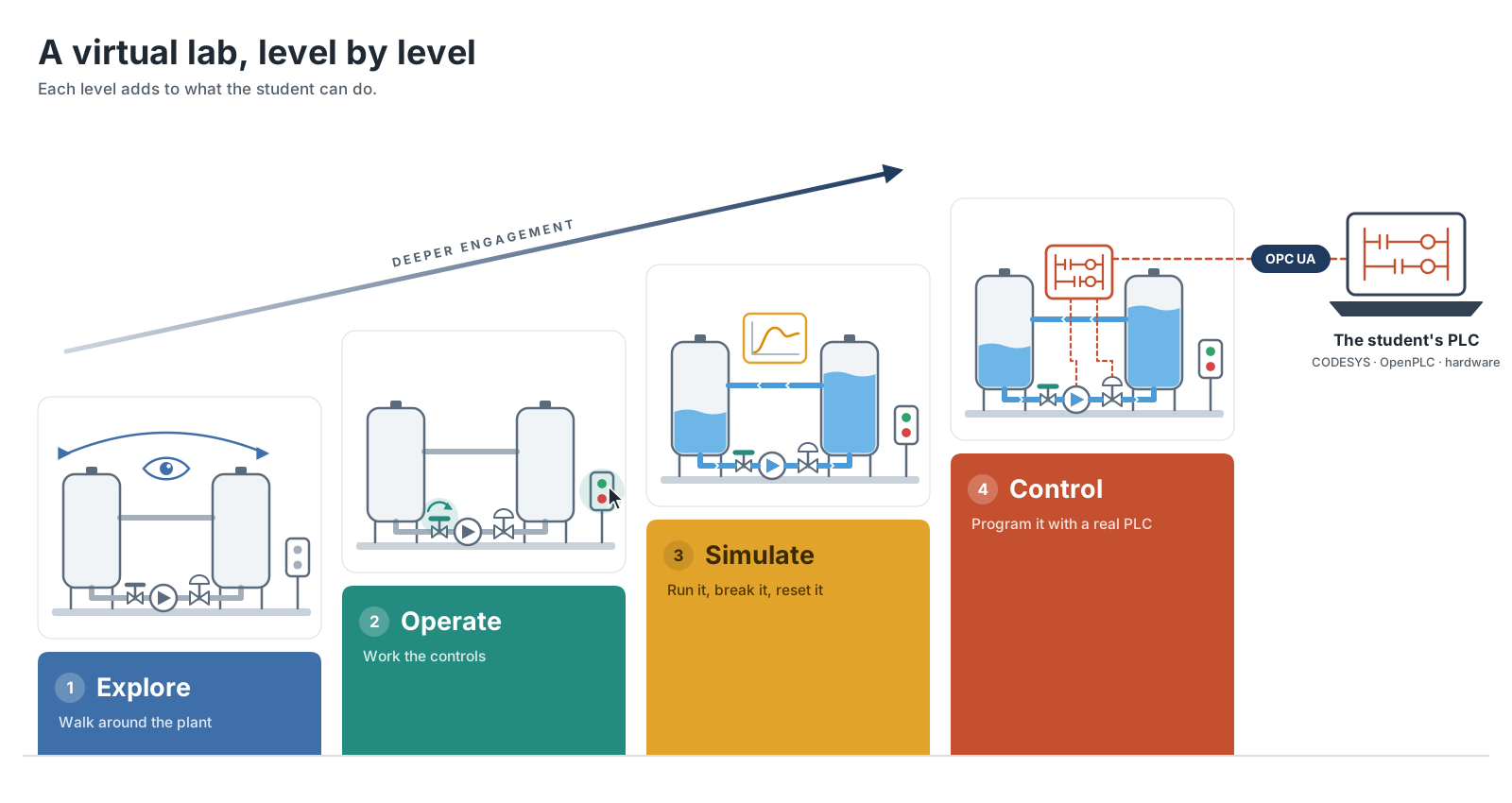
The two-tank lab goes all the way down. Before pressing Play, the student picks who drives it. In Manual mode nothing controls the plant, so the student is the controller, holding the level by hand. That’s a quick way to find out why automatic control exists. In Simulated mode a built-in controller runs the finished plant and the student is the operator. In PLC mode the student’s own program is in charge.
The same rig works for a beginner, an intermediate student and an advanced one.
The two-tank rig
It’s a skid-mounted recirculating rig you can walk around at human scale. A centrifugal pump lifts water from feed tank T1 through a control valve into receiving tank T2, and gravity brings it back. Along the way there are level, flow and pressure transmitters, float switches, hand valves and a control panel whose lid swings open to show the PLC inside. The tags follow ISA-5.1, so LT, FT, PT, LSL and LSH mean what they mean on a real plant.
Two-tank rigs are the classic process control teaching plant, because one loop covers nearly everything. The lab works through it in five exercises.
| # | Exercise | What’s new |
|---|---|---|
| 1 | Manual pump and valve control | A start/stop latch / command versus feedback |
| 2 | Permissives, interlocks and safe stop | Start permissives versus run interlocks / fail-safe behaviour |
| 3 | Automatic tank filling | On/off level control / why a deadband stops short-cycling |
| 4 | Transfer sequence, alarms and reset | Step sequencing and timers / a latched alarm that only resets when every cause is healthy |
| 5 | Closed-loop control and analogue trips | Manual/auto handover / a proportional controller / pressure trips |
Each exercise builds on the program from the one before, and together they’re about five to six hours of hands-on work.
Break it on purpose
Students can overflow a tank, run the pump dry, close a valve against it or hit the e-stop, and watch the alarms and trips respond. Then they practise the reset discipline, because RESET is refused while the cause is still there.
Labs can also inject faults. In the video the level transmitter freezes and the loop keeps opening the valve, chasing a level it can’t see. The two-tank lab also has a biased flow meter, a pressure transmitter that fails low and a sticky control valve. Students diagnose each one from how the plant behaves, the way they would on site.
When they’re done, one click puts everything back to the start.
You also get to see things a real rig won’t show you. Tanks and pipes can be made see-through, so you can watch levels and water moving at the real flow rate. Switch to X-Ray or open a cutaway and you can watch the impeller run up inside the pump casing when it starts, and coast down when it trips. Exploded views take an assembly apart step by step, and moving parts keep moving while it’s apart.
Bring your own PLC
Browsers can’t talk to industrial controllers, so there’s a small helper called the PLC bridge that the student installs once on their own computer. It connects the virtual plant to any PLC with an OPC UA server. That could be a soft PLC like CODESYS or OpenPLC running on the laptop, or a hardware PLC on the network.
Students work in the same industrial tools they’ll use on the job, in ladder, structured text or any of the other IEC 61131-3 languages. A Tags button copies every variable their program needs, spelled exactly as the lab expects, ready to paste into the project. The PLC tab then shows how many of the required signals matched. That removes one of the most annoying beginner problems before it starts.
After that it’s commissioning. You download the program, line up the valves, press start, provoke each protection and check the logic responds the way you predicted.
What’s next
EIT is piloting the labs in its Professional Certificate of Competency in PLCs and SCADA Systems. For now they’re optional and not part of the curriculum or assessment. The video calls the two-tank rig “one lab of many”.
I’m really looking forward to 2027, and to talking more about the work EIT is doing in using technology to help people learn. Some of that involves AI, but it’s definitely not all about AI.
Learning anything technical should have some tension in it. If it’s too easy, you’re just glossing over it. I think technology can break that tension into smaller steps that people can actually manage, so learning becomes more effective and more enjoyable at the same time.
I’m hoping there’ll be more I can show then, as EIT makes it public, and I’m keen to help improve engineering education along the way.