For decades, I have wrestled with the same practical problem, how to produce accurate timesheets without interrupting deep technical work every hour.
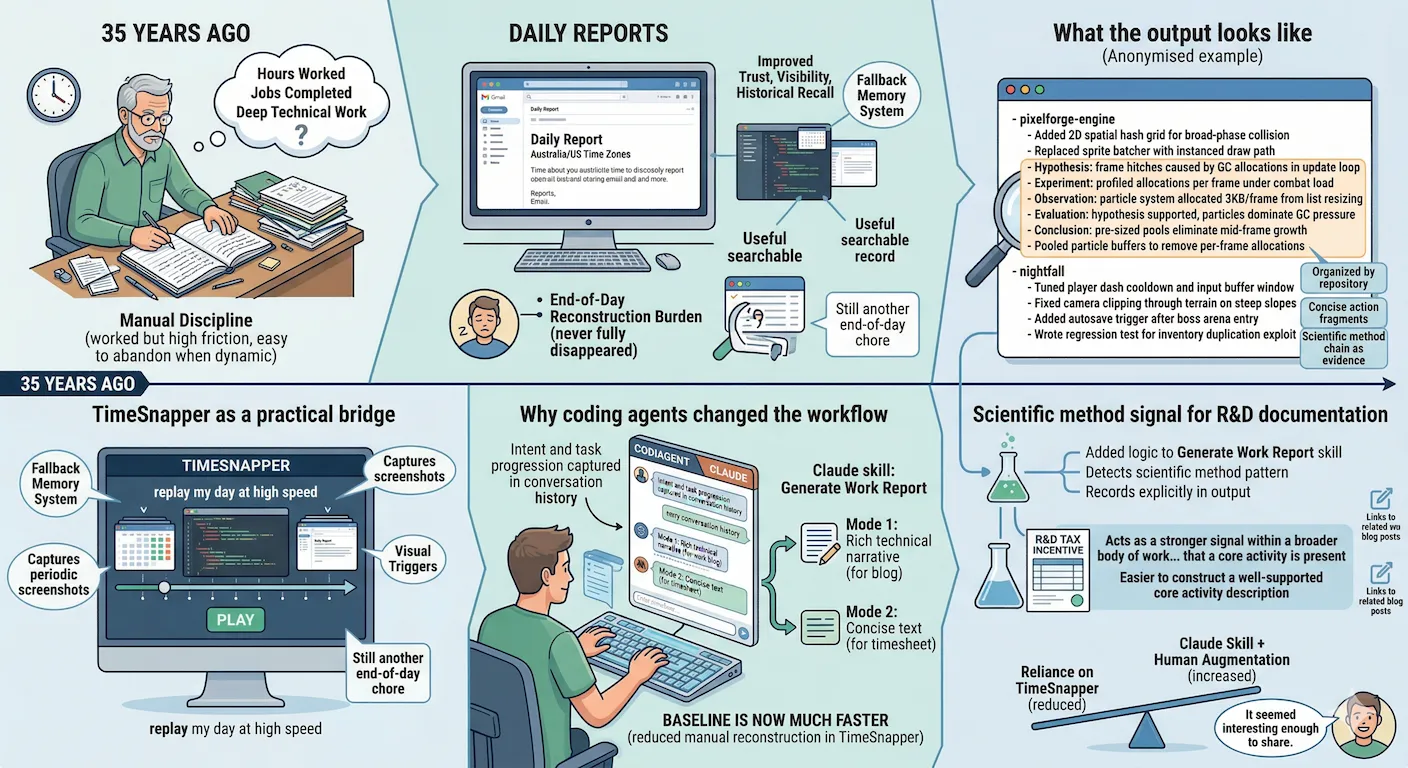
I still have old paper diaries from around 35 years ago where I wrote down hours worked and jobs completed. That manual discipline worked, but it was high friction and easy to abandon once work became more dynamic and interrupted.
Later, I moved to daily reports, especially when working across Australia and US time zones. That approach helped with trust, visibility, and historical recall. It also created a useful searchable record. But even with daily reports, the end-of-day reconstruction burden never fully disappeared.
If you leave timesheets too long, details fade fast. A week later the granularity is gone, and that matters on chargeable work.
TimeSnapper as a practical bridge
For some time, I have used TimeSnapper as a fallback memory system. It captures periodic screenshots and lets me replay my day at high speed, giving me visual triggers for what I worked on, when I switched tasks, and where I lost time to context switching.
I combine that replay with commit history, calendar entries, and memory to complete timesheets or developer log entries.
This has worked well enough, but replaying even at high speed is still another end-of-day chore.
Why coding agents changed the workflow
As I shifted more development work into coding-agent interaction loops, a new pattern became obvious, much of my intent and task progression was already captured in the conversation history.
That prompted me to create a Claude skill called Generate Work Report. I run it in two modes. One produces rich technical narrative for a developer blog. The other produces concise text that fits in a client timesheet text box.
Over the last few weeks, this has reduced the amount of manual reconstruction I need to do in TimeSnapper. I still augment the generated output with information the agent cannot know, offline work, meetings away from keyboard, and context from memory, but the baseline is now much faster.
What the output looks like
Below is an anonymised example of a timesheet entry the skill generated. I have substituted real client work with a fictional game development scenario so that the structure is clear without sharing anything confidential.
- pixelforge-engine
  - Added 2D spatial hash grid for broad-phase collision
  - Replaced sprite batcher with instanced draw path
  - Hypothesis: frame hitches caused by GC allocations in update loop
  - Experiment: profiled allocations per frame under combat load
  - Observation: particle system allocated 3KB/frame from list resizing
  - Evaluation: hypothesis supported, particles dominate GC pressure
  - Conclusion: pre-sized pools eliminate mid-frame growth
  - Pooled particle buffers to remove per-frame allocations
- nightfall
  - Tuned player dash cooldown and input buffer window
  - Fixed camera clipping through terrain on steep slopes
  - Added autosave trigger after boss arena entry
  - Wrote regression test for inventory duplication exploit
Work is organised by repository, mirroring how the day actually ran. Each line is a concise action fragment, not a paragraph, which is what fits in a client timesheet text box.
The Hypothesis through Conclusion sequence reads in order as a coherent reasoning block, followed by the actual fix as a normal action line. The investigative logic stays intact rather than being collapsed into a single “fixed bug” line, which matters when the record is used as R&D evidence.
Scientific method signal for R&D documentation
Another use case emerged while preparing evidence for an R&D tax incentive workflow based on development records from multiple systems.
As part of that work, I added logic to the Generate Work Report skill so that if it detects a scientific method pattern in the work narrative, hypothesis, experiment, result, iteration, it records that explicitly in the output.
A small scientific method chain like the particle system example above does not necessarily map directly to a core activity on its own. Core activity is an R&D tax incentive term with a specific definition. What the chain does is act as a stronger signal within a broader body of work that a core activity is present. The more of these signals the record contains, the easier it is to construct a well-supported core activity description when the submission is prepared.
Where things stand
I am not abandoning TimeSnapper, but I am relying on it less for routine reconstruction. The Claude skill approach is working well for day-to-day reporting and timesheet entry, especially when coding-agent interaction is already central to the workflow.
I have been enjoying how this is working. I will probably keep using it. It seemed interesting enough to share.
PS on the illustration
The image attached to this post is AI generated, made with Gemini. I think these illustrations are worth including, particularly when there is no natural photograph or screenshot that fits the topic. This one does capture what the post is about.
The risk is that readers will dismiss it as slop, and I understand that. AI image styles are also not immune to dating. If volume generation accelerates, a recognisable style can start to look tired faster than a hand-drawn one would. If the illustration puts you off, I am sorry for that. I will keep using them as long as I think they add something.
Related posts on daily reports and implementation
- AI Badge Syntax Help and Future UI Thoughts - history of daily reporting from 2001, trust-building rationale, and a Retype-based implementation with automated timesheet processing.
- Claude Code for Web Experiment - using historical daily report emails as source material and transforming that documentation into structured blog content.